The Problem
Lowe's was investing heavily in AI agents to power core business functions. Teams across the org had already built multiple customer- and employee-facing AI chat experiences, but each one looked and behaved differently. Before scaling across more consumer and enterprise platforms, Lowe's needed to standardize to one AI chat design system going forward to avoid user confusion and simplify component reuse.

The unique AI chat systems that needed unification, illustrated here by their entry points and avatars.
My Role
As the lead product designer, I was responsible for determining which components belonged in the kit, whether new components were needed, and how they would extend Lowe's existing design system, Backyard. I partnered with design system owners on implementation, iterated on stakeholder feedback, discovered product requirements through design reviews, and aligned executive stakeholders on the final system. Individual chat interaction design remained owned by each product team.
- Team: Lead product designer (me), principal product designer, 2 senior product designers
- Stakeholders: Design system owners, UX leadership, product and design managers across chat teams
- Timeline: 2 weeks team collaboration, 2 weeks iterative design, stakeholder review, and finalization, ~4 weeks implementation
Discovery & Approach
The other product designers and I pulled examples from each of Lowe's existing chats, plus relevant examples from other customer and enterprise chat experiences. Over two collaborative sessions (4–5 hours total), we identified all components that needed to be included in the kit and determined what these components needed to do globally across all implementations.
My role in these sessions was to synthesize across the different implementations — translating what we were describing into how it all fit together as a coherent system.
From there, I codified our decisions to create the component kit. Specifically, I needed to determine:
- Which existing design system components could be reused with standardized specifications
- Which new components needed to be created and added to the design system
- How and when to use each component
- How they all worked together as a system
- How to meet all these needs while balancing usability, accessibility, and flexibility for implementation
The Solution
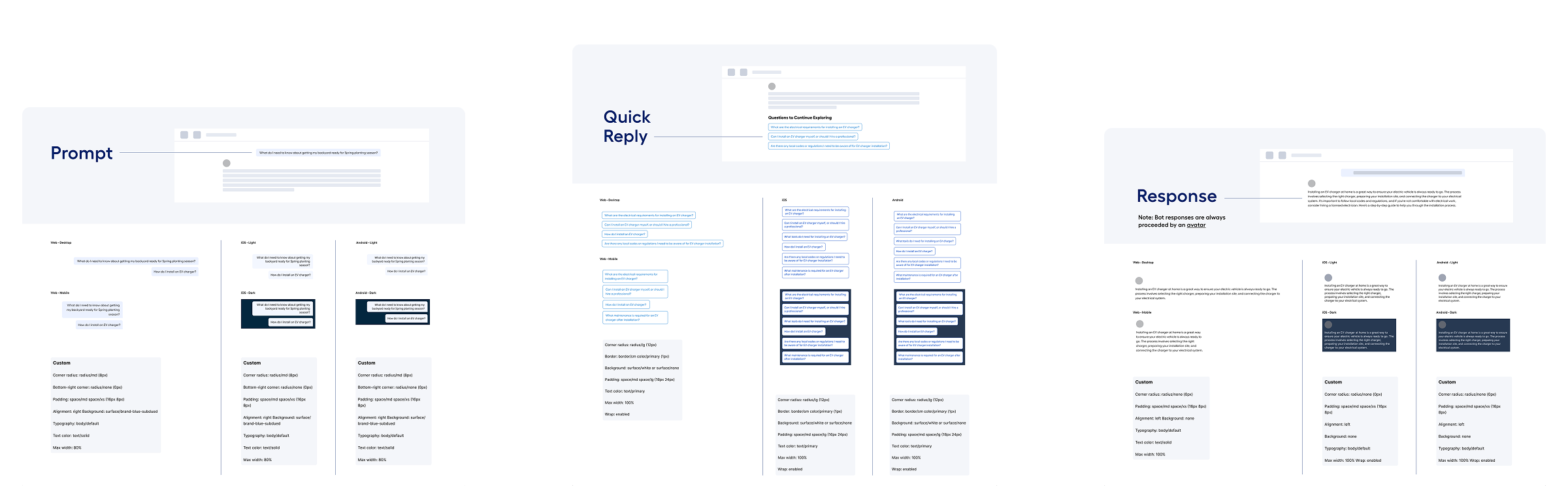
I created the AI Chat Component Kit to define these decisions. Our goal was to reuse existing components, but the team recognized standardization would likely uncover new component needs to support business or user needs. Ultimately, I recommended three new components to be added to Backyard, Lowe's design system to support the new chat kit:
Prompt is the user input that initiates each conversation. I designed this component to ensure a conversational affordance by aligning it to the right and limiting it to 80% width. Prompt was a net-new addition to Backyard.
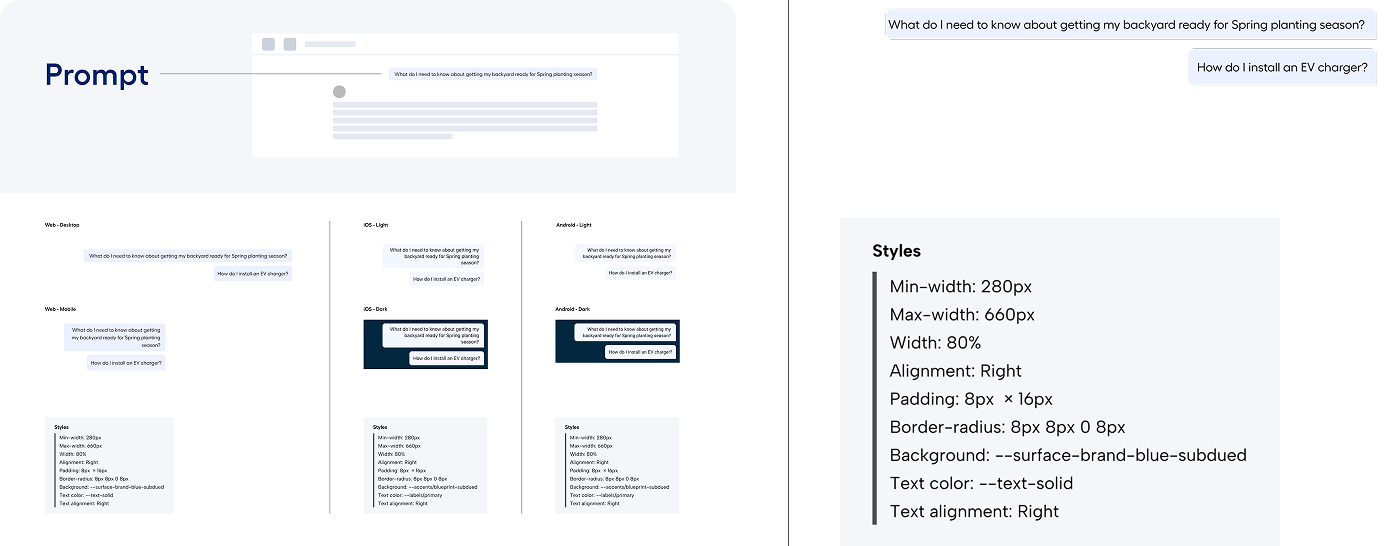
The Prompt component was created to provide the affordance of a conversational chat.
Response is the AI response to a user prompt. I designed Response to be full width, right aligned, and stacked below the bot's avatar.
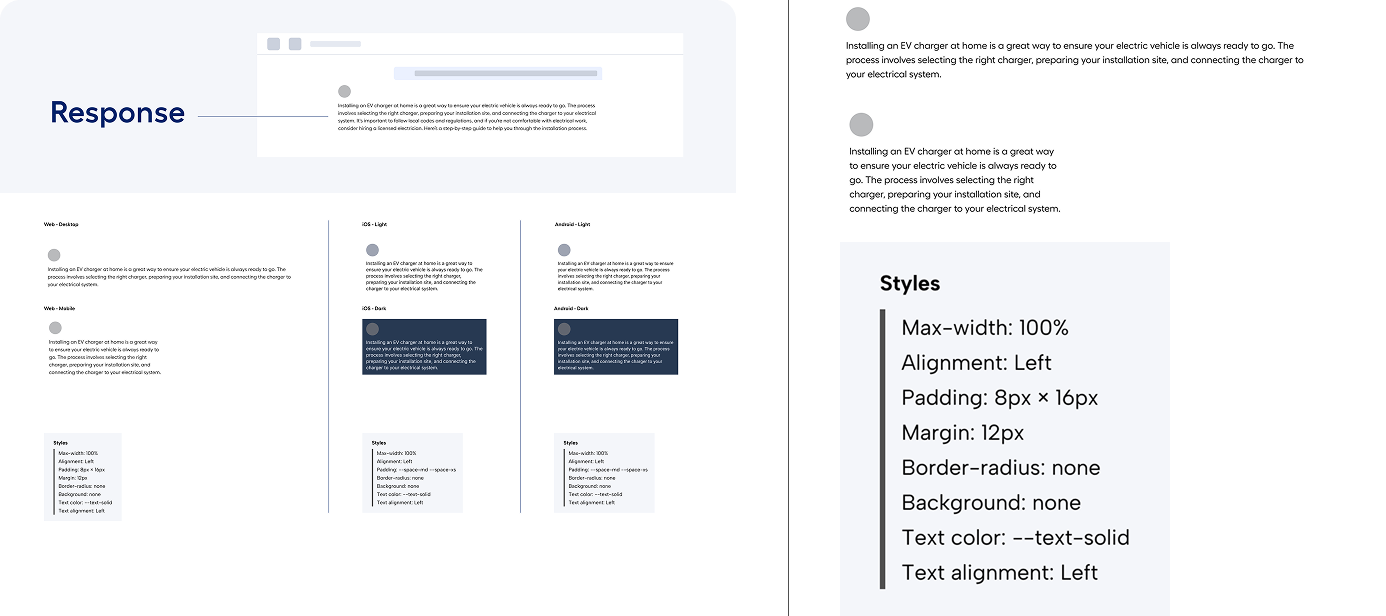
The Response component was created to represent the agent response in each conversation.
Quick Reply was added to give users a way to quickly tap a question or statement from the AI agent; the tapped input becomes the user's Prompt. Initially, stakeholders were hesitant to create a new component for quick replies because a Chip component already existed for this purpose. The issue was that Chip was created to accommodate labels: it had capsule corners, a short max length, and no ability to wrap. In conversational UIs, we needed to accommodate full sentences with high character limits that had to wrap, especially on small screens. I created prototypes to share with stakeholders to show them the existing Chip limitations. Ultimately, the team aligned around my recommendation and Quick Reply was created.
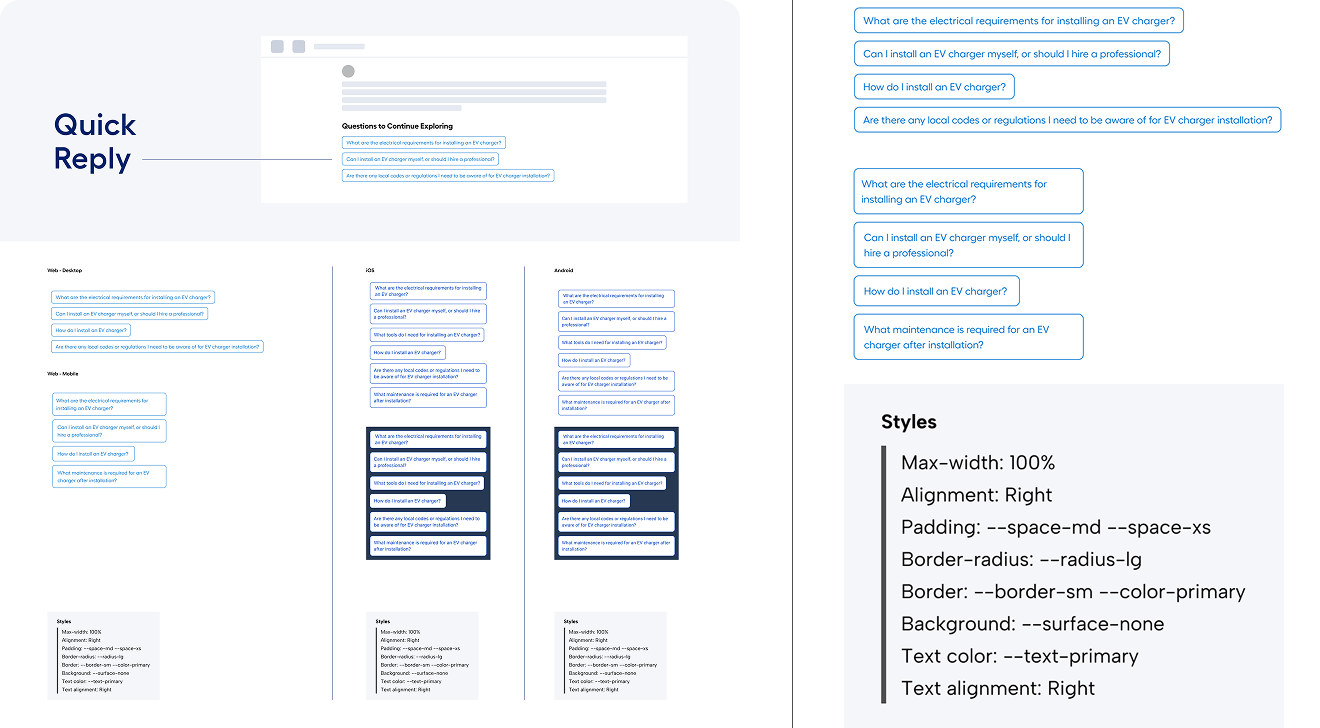
The Quick Reply component was created to accommodate full sentences and to wrap on small screens.
For all three new components, I designed each component in Figma and documented the layout, spacing, sizing, and styles specifications, noting how existing tokens should be applied when applicable.
The remaining components used in the AI Chat Component Kit were existing components from Backyard. For these components, I wrote the token configurations to be used when building AI chats by documenting which design tokens and existing styles to use for each component in chat contexts.
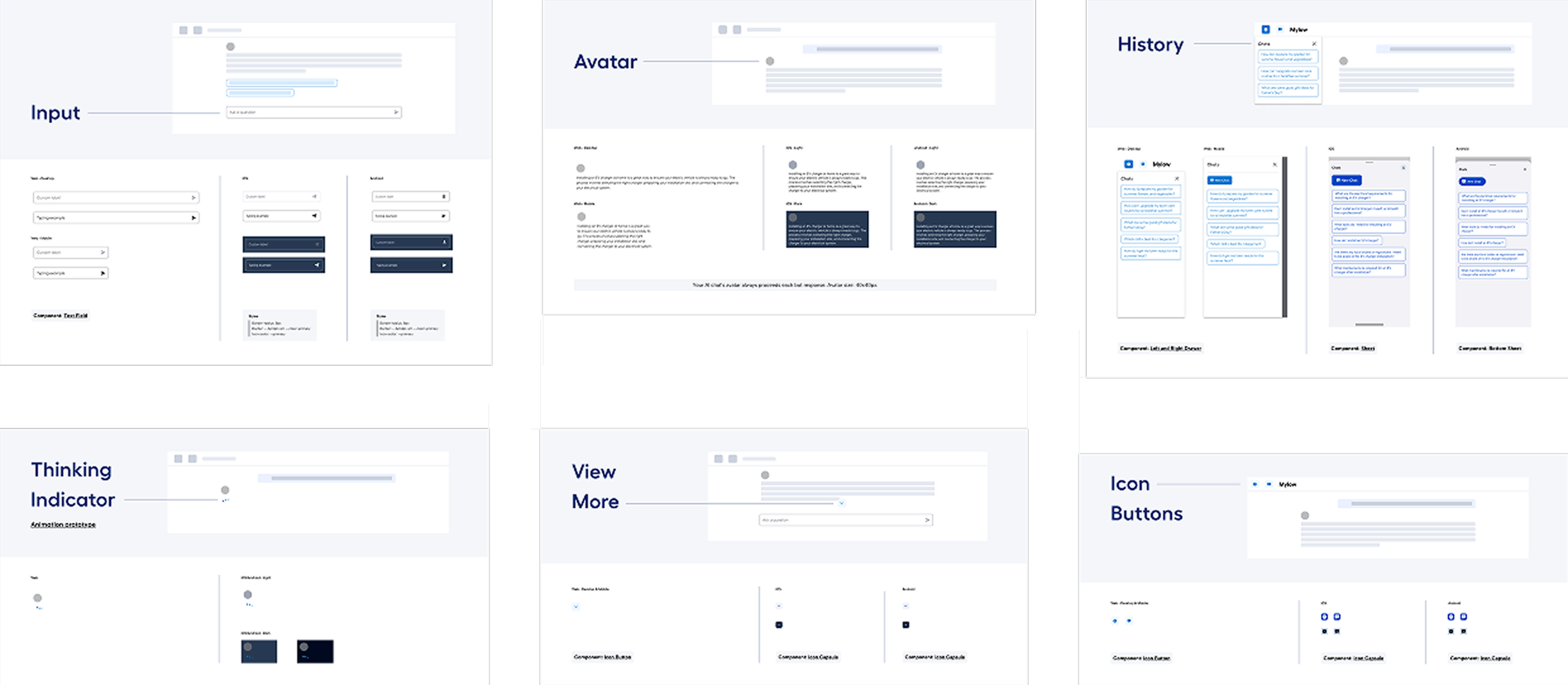
The Chat Component Kit codified existing component usage.
Prototypes
The AI Chat Component Kit did not seek to unify all interaction design, but I used high-fidelity prototypes to illustrate new interaction patterns. One example of this was the History menu: because the desktop and mobile web implementations were slightly different (the former slid in while the latter slid over), I prototyped both interactions to clarify the differences between them.
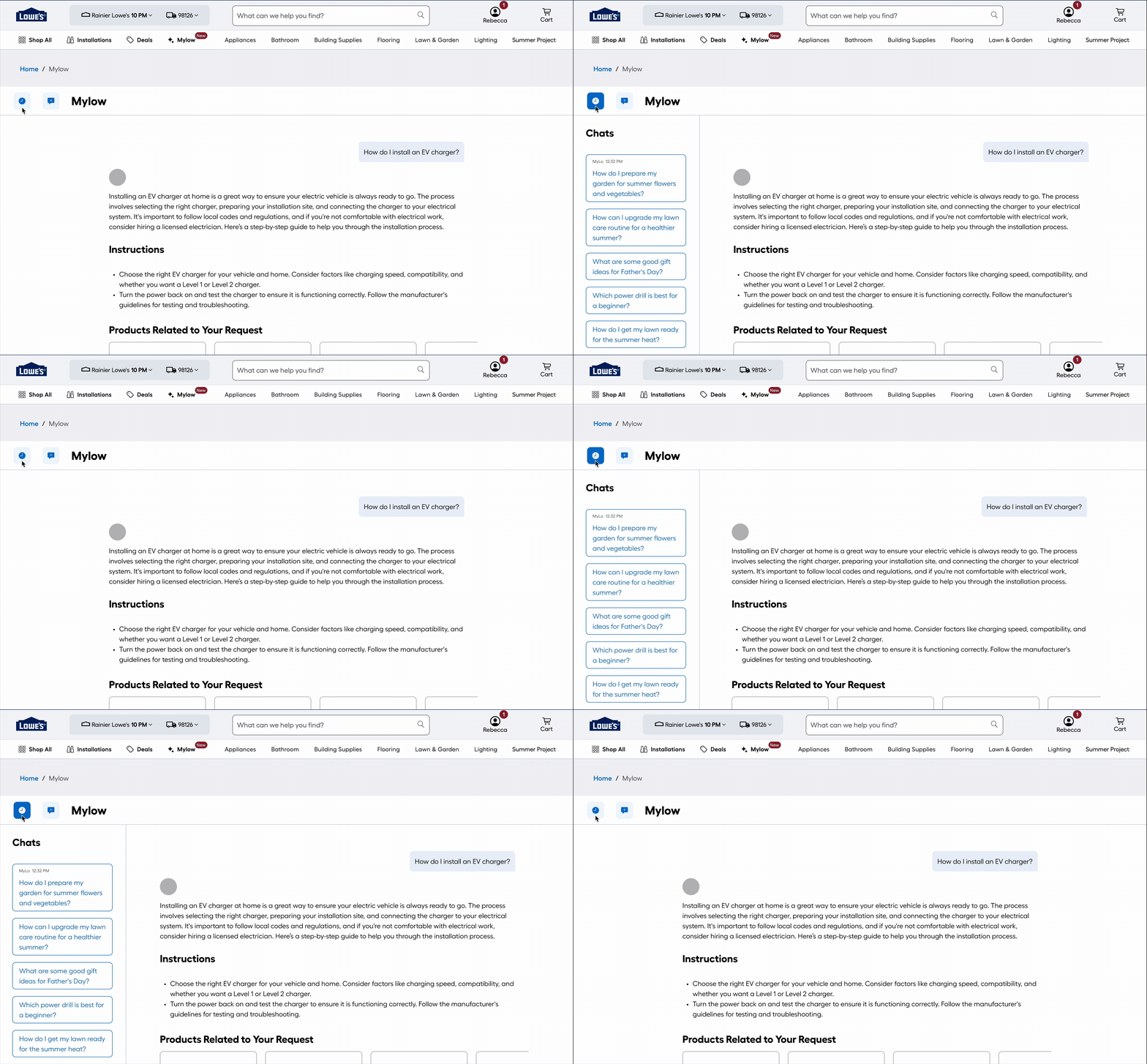
The History menu prototype shows desktop web's slide-in interaction.
Feedback
As mentioned above, this project had numerous stakeholders across the design org including executive leaders. I met with them throughout the project to share my recommendations and their rationales. Stakeholders shared a lot of feedback during these meetings; I managed their diverse feedback by using it to design alternative components and layouts. These served to make their ideas real and give everyone a chance to consider each one. This also meant I could share new designs asynchronously to keep the project moving between reviews.
Alternate desktop history prototype
Outcomes
After several reviews, the AI Chat Component Kit was signed off on by leaders and stakeholders and was integrated into Backyard. The three new components (Prompt, Response, and Quick Reply) were added to the design system in beta, and the codified token configurations for existing components were documented in Backyard usage sets.
The system was first used to implement a new, global employee chat, launched in February 2026; having the component kit available simplified overall implementation. The system is also currently being applied to existing AI chats including MyLow (customer-facing) and Lowe's Assistant (in-store employee-facing).